Feature Loaded
Features
Everything you need for a consistent Google review process
Automate the ask, follow up politely, respond professionally and display genuine customer proof. All from one connected system with personal onboarding and UK-based support.
Explore the complete review process
Automate the ask, follow up politely, respond professionally and display genuine customer proof. All from one connected system with personal onboarding and UK-based support.
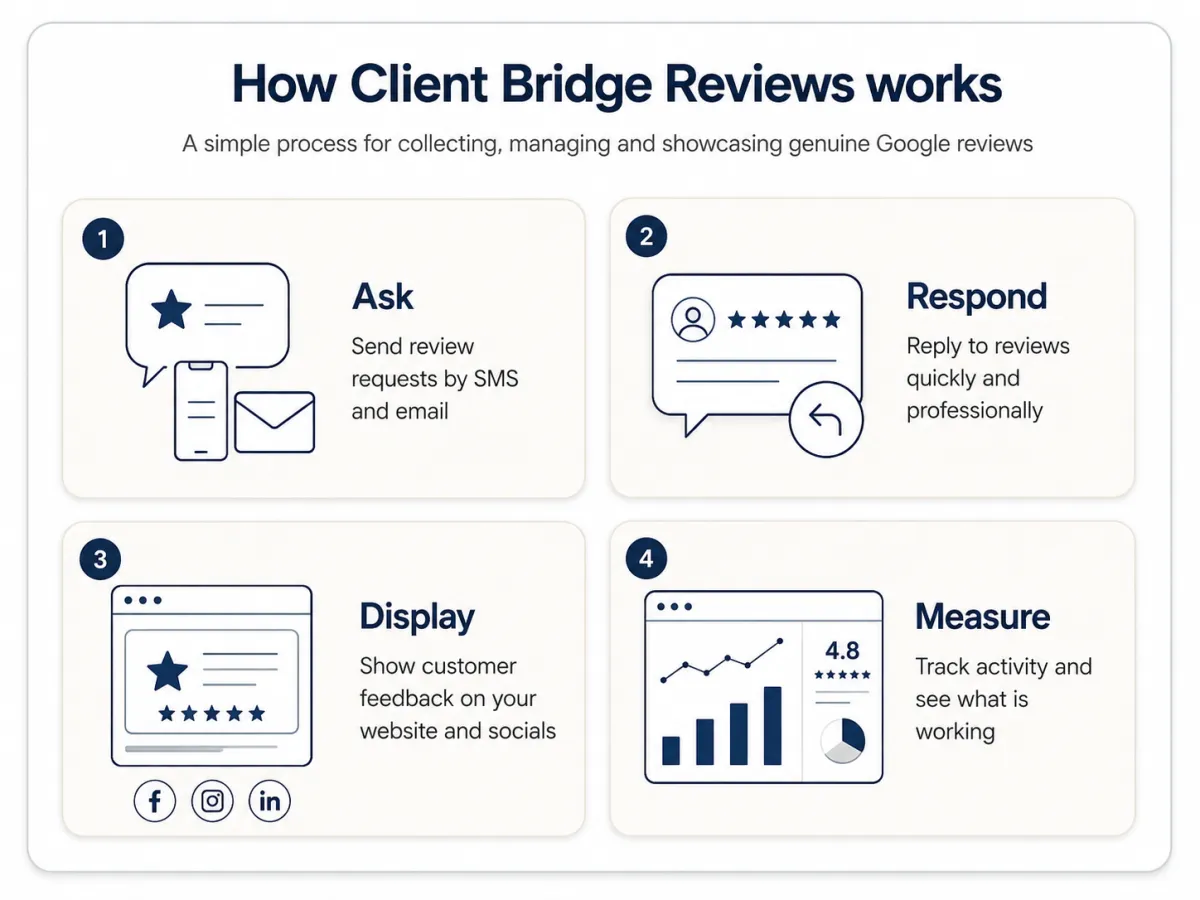
Collect and Learn
Ask customers for reviews, follow up politely and capture useful private feedback.
Respond Professionally
Save time replying to reviews while keeping control of your tone and sensitive responses.
Display Customer Proof
Show genuine customer reviews on your website and social channels where more people can see them.
Manage and Measure
Connect your Google profile and keep track of requests, reviews and recent activity.
Launch with Support
Get help setting everything up and a clear route to support after launch.
Collect and
Learn
Ask customers for reviews, follow up politely and capture useful private feedback.
Respond Professionally
Save time replying to reviews while keeping control of your tone and sensitive responses.
Display Customer Proof
Show genuine customer reviews on your website and social channels where more people can see them.
Manage and
Measure
Connect your Google Business profile and keep track of requests, reviews and recent activity.
Launch with Support
Get help setting everything up and a clear route to support after launch.
COLLECT AND LEARN
Collect more genuine feedback - consistently
Good customer experiences do not automatically become visible reviews. These features make the ask easier, follow up respectfully and create an additional route for useful private feedback.
1. Automated Review Requests
Good service does not automatically turn into visible proof. Most customers simply move on with their day unless someone makes the next step easy.
Automated Review Requests send a review message after a clear event, such as a completed appointment, finished job or another agreed point. The customer receives a branded SMS and email with a simple link to leave honest feedback.
Your team does not have to remember who to contact or when. Every eligible customer can be asked in the same fair and consistent way.
Key benefits:
Review requests are sent at the right time
Less manual work for your team
More eligible customers are given the chance to respond
1. Automated Review Requests
Good service does not automatically turn into visible proof. Most customers simply move on with their day unless someone makes the next step easy.
Automated Review Requests send a review message after a clear event, such as a completed appointment, finished job or another agreed point. The customer receives a branded SMS and email with a simple link to leave honest feedback.
Your team does not have to remember who to contact or when. Every eligible customer can be asked in the same fair and consistent way.
Key benefits:
Review requests are sent at the right time
Less manual work for your team
More eligible customers are given the chance to respond
2. SMS & Email Review Requests
Some customers notice a text first. Others prefer an email.
SMS & Email Review Requests let you use SMS, email or an agreed combination of both. Each message can include your business name, the customer’s name and wording agreed with you.
Every message gives the customer a simple link to leave honest feedback. Your staff do not have to write and send each message themselves. Contact permissions and opt-outs must still be respected.
Key benefits:
Choose the channel(s) that suit your customers
Send branded, personalised messages
Reduce manual sending for your team
3. Review Reminders
People often mean to respond but forget. They may be busy when the first review request arrives.
Review Reminders send a small number of polite follow-up messages at agreed times. The reminders can stop when the tracked review link is clicked, so your team does not need to keep a separate chase list. A link click does not prove that a Google review was posted.
The reminders use clear limits and respectful wording. The aim is to give customers another chance to respond without putting them under pressure.
Key benefits:
Gives busy customers another chance to respond
Reduces manual chasing for your team
Uses clear limits so reminders stay respectful
3. Review Reminders
People often mean to respond but forget. They may be busy when the first review request arrives.
Review Reminders send a small number of polite follow-up messages at agreed times. The reminders can stop when the tracked review link is clicked, so your team does not need to keep a separate chase list. A link click does not prove that a Google review was posted.
The reminders use clear limits and respectful wording. The aim is to give customers another chance to respond without putting them under pressure.
Key benefits:
Gives busy customers another chance to respond
Reduces manual chasing for your team
Uses clear limits so reminders stay respectful
4. Ask Previous Customers for Reviews
Past customers may have had a good experience but never been asked for a review.
A previous-customer campaign sends a clear review request to people who have used your services before and who you are allowed to contact. We help check the list, agree the message and send the campaign in sensible batches.
You cannot simply message every old contact. You must have a valid reason to use their details, respect opt-outs and never offer rewards for reviews.
Key benefits:
Makes better use of your existing customer list
Brings older customer experiences into view
Sends the campaign at a sensible pace
5. Private Customer Feedback
Some customers want more space to explain what happened, or may prefer to contact your business directly.
Private Customer Feedback gives them a form where they can send comments to you. Their feedback can go to the right person so your business can understand the issue and respond.
The public Google review option must still be available to everyone. Private feedback is there to help you listen, not to stop unhappy customers from leaving a public review.
Key benefits:
Hear about problems earlier
Give customers more space to explain
Send feedback to the right person quickly
5. Private Customer Feedback
Some customers want more space to explain what happened, or may prefer to contact your business directly.
Private Customer Feedback gives them a form where they can send comments to you. Their feedback can go to the right person so your business can understand the issue and respond.
The public Google review option must still be available to everyone. Private feedback is there to help you listen, not to stop unhappy customers from leaving a public review.
Key benefits:
Hear about problems earlier
Give customers more space to explain
Send feedback to the right person quickly
Respond professionally
Respond professionally without starting from a blank page
Replying to reviews shows customers that your business is listening. AI can help write replies faster, while you still keep control of complaints and sensitive feedback.
6. AI Review Replies
Writing a different reply to every review takes time.
AI Review Replies can create a suggested response for you to check and edit. Where agreed, some replies may be posted automatically using set rules. The wording can match your normal tone, and different star ratings can be handled in different ways.
For complaints or sensitive feedback, we recommend that a person checks the reply before it is published.
Key benefits:
Saves time writing replies
59% of prospects expect responses within 24 hours
AI Helps you respond faster and more consistently
Keeps human control for sensitive reviews
6. AI Review Replies
Writing a different reply to every review takes time.
AI Review Replies can create a suggested response for you to check and edit. Where agreed, some replies may be posted automatically using set rules. The wording can match your normal tone, and different star ratings can be handled in different ways.
For complaints or sensitive feedback, we recommend that a person checks the reply before it is published.
Key benefits:
Saves time writing replies
59% of prospects expect responses within 24 hours
AI Helps you respond faster and more consistently
Keeps human control for sensitive reviews
Display customer proof
Put genuine customer proof where people can see it
Good reviews should not stay hidden on your Google profile. These features help you show genuine customer feedback on your website and social media.
7. Website Review Widget
Your website tells people what you do. Reviews show what customers think about it.
The Website Review Widget displays genuine reviews on your site. It can sit near a service, contact form or booking button, so visitors can see customer feedback without leaving the page.
The widget can be styled to fit your brand and can update as connected reviews change. The source should always be clear.
Key benefits:
Keeps customer proof on your website
Places reviews near important actions
Updates without copying reviews by hand
7. Website Review Widget
Your website tells people what you do. Reviews show what customers think about it.
The Website Review Widget displays genuine reviews on your site. It can sit near a service, contact form or booking button, so visitors can see customer feedback without leaving the page.
The widget can be styled to fit your brand and can update as connected reviews change. The source should always be clear.
Key benefits:
Keeps customer proof on your website
Places reviews near important actions
Updates without copying reviews by hand
8. Social Media Review Sharing
A good review can be useful in more than one place.
Social Media Review Sharing lets you choose a genuine review, turn it into a social post, adjust the design or caption and schedule it for a connected social account.
Keep the customer’s meaning unchanged. Check names and personal details before sharing.
Key benefits:
Turns reviews into ready-made content
Helps more people see customer feedback
Saves time creating social posts
Manage and measure
Keep the review process connected and visible
Connect the right Google Business Profile and use the dashboard to see review requests, recent activity and overall review trends in one place.
9. Google Business Profile Integration
Your Google Business Profile is where customers leave and read your Google reviews.
Once the correct Google account and location are connected, reviews can appear inside the platform. You can then manage replies and use other review features without moving between different systems.
Each standard subscription connects one Google Business Profile location. Your business keeps full ownership of the profile.
Key benefits:
See connected reviews in one place
Manage replies more easily
Supports reporting and other review tools
9. Google Business Profile Integration
Your Google Business Profile is where customers leave and read your Google reviews.
Once the correct Google account and location are connected, reviews can appear inside the platform. You can then manage replies and use other review features without moving between different systems.
Each standard subscription connects one Google Business Profile location. Your business keeps full ownership of the profile.
Key benefits:
See connected reviews in one place
Manage replies more easily
Supports reporting and other review tools
10. Live Performance Dashboard
You should be able to see whether the review process is being used.
The Live Performance Dashboard shows activity such as review requests sent, the channel used, send dates, reviews received over time and overall trends.
It helps you see what is happening, but it cannot always prove which individual request led to a particular Google review.
Key benefits:
Check that requests are being sent
See review activity and trends
Find recent request details in one place
Launch and support
Launch with guidance and keep a human route to help
You receive more than software access. Personal onboarding helps you set everything up and test it before launch. UK-based support gives you a clear place to ask questions afterwards.
11. Personal Onboarding
Software is only useful when it is set up properly.
Personal Onboarding gives you a real person to help connect your Google Business Profile, agree the review process, prepare your messages, check the triggers, run a test and get ready to launch.
The monthly plan includes personal onboarding. Any extra custom build or integration work is discussed and priced separately.
Key benefits:
Help from a real person
A tested setup before launch
Messages and steps shaped around your business
11. Personal Onboarding
Software is only useful when it is set up properly.
Personal Onboarding gives you a real person to help connect your Google Business Profile, agree the review process, prepare your messages, check the triggers, run a test and get ready to launch.
The monthly plan includes personal onboarding. Any extra custom build or integration work is discussed and priced separately.
Key benefits:
Help from a real person
A tested setup before launch
Messages and steps shaped around your business
12. UK-Based Support
When you need help, you should not have to work everything out alone.
UK-Based Support gives you access to people who understand the service and can explain the next step in plain English. Support starts by email. A call or meeting can be arranged when it is the better way to solve the problem.
Support can cover settings, message changes, review activity and everyday account questions. It is not a 24-hour or instant service.
Key benefits:
Clear help in plain English
Support from people who know the service
A call or meeting can be arranged when needed
Features
Frequently Asked Questions
How do automated review requests work?
A review request can be triggered after an agreed event, such as a completed appointment, finished job or another suitable point in the customer journey. The customer receives a branded SMS, email or agreed combination of both, with a simple link to leave honest feedback.
Will customers receive both an SMS and an email?
The review journey can use SMS, email or an agreed combination of both. The channels, wording and timing are agreed during onboarding, and messages are limited so the process remains helpful rather than pushy.
How do review reminders work?
A small number of polite follow-up messages can be sent at agreed times when a customer has not clicked the tracked review link. The reminders use clear limits and respectful wording. A link click can be tracked, but it does not prove that a Google review was posted.
Can I ask previous customers for Google reviews?
Yes, where the customer data is suitable and the contact is lawful and appropriate. We can help check the list, agree the message and send a one-off campaign in sensible stages rather than contacting every old record at once.
How do AI review replies work?
AI can prepare a suggested reply for you to check, edit and publish. Where agreed, simple replies may also be handled automatically using set rules and a tone approved by you. Complaints, personal details and sensitive comments should still be checked by a person before publication.
How does private customer feedback work?
Customers first choose one of five satisfaction faces. Customers selecting faces 1–3 are taken to a private feedback form where they can explain what happened, while a visible option to leave a public Google review remains available. Customers selecting faces 4–5 continue towards the Google review page. The private route must not stop or discourage anyone from leaving an honest public review.
Can the system tell exactly who left a Google review?
The system can show when requests were sent and when tracked links were clicked. Once a customer enters Google, it cannot normally confirm with certainty that the same person published a review. The dashboard can still show overall request activity and review trends.
How do the website widget and social sharing features work?
The website widget can display genuine connected reviews on your website, while selected reviews can be turned into social posts for supported accounts.
Let's Get Started
© 2026 Client Bridge Network Limited. Trading as Client Bridge Reviews. All rights reserved.